



June 12, 2026, 13:00
How do you remove your Bancontact One Click token?
Bancontact One Click makes deposits faster and easier. Thanks to a secure token, you do not need to re-enter your card details every time you make a deposit to your PepperMill Casino account.
That said, there are situations where you may need to remove and reactivate your token. This is in fact the most common reason why players adjust their Bancontact One Click settings.
Why is my Bancontact One Click no longer working?
An important characteristic of Bancontact One Click is that a token can only be active on one device at a time.
Have you recently switched smartphones, changed your browser, reset your device, or activated Bancontact One Click on a different device? If so, your saved token may no longer work on the device you are currently using.
In that case, you do not need to contact your bank. You can usually resolve the issue by removing your existing token and reactivating it on your preferred device.
What is a Bancontact One Click token?
When you make a deposit via Bancontact One Click for the first time, a secure token is created. This token replaces your payment details and allows future deposits to be processed more quickly.
Because a token is linked to one specific device, it provides an extra layer of security against unauthorized use.
When should you remove a token?
Removing a token can be useful in a number of situations:
· You have a new smartphone or computer.
· You have activated One Click on a different device.
· You are using a new bank card.
· You want to reconfigure your payment settings.
· You prefer a fresh activation for added security.
In most cases, a device change is the cause.
How to remove your Bancontact One Click token
Follow these steps to remove your current token:
Log in to your PepperMill Casino account.
Click on "Deposit".
Find your saved Bancontact One Click token.
Click the trashcan icon to delete it.
Your token has been successfully removed.
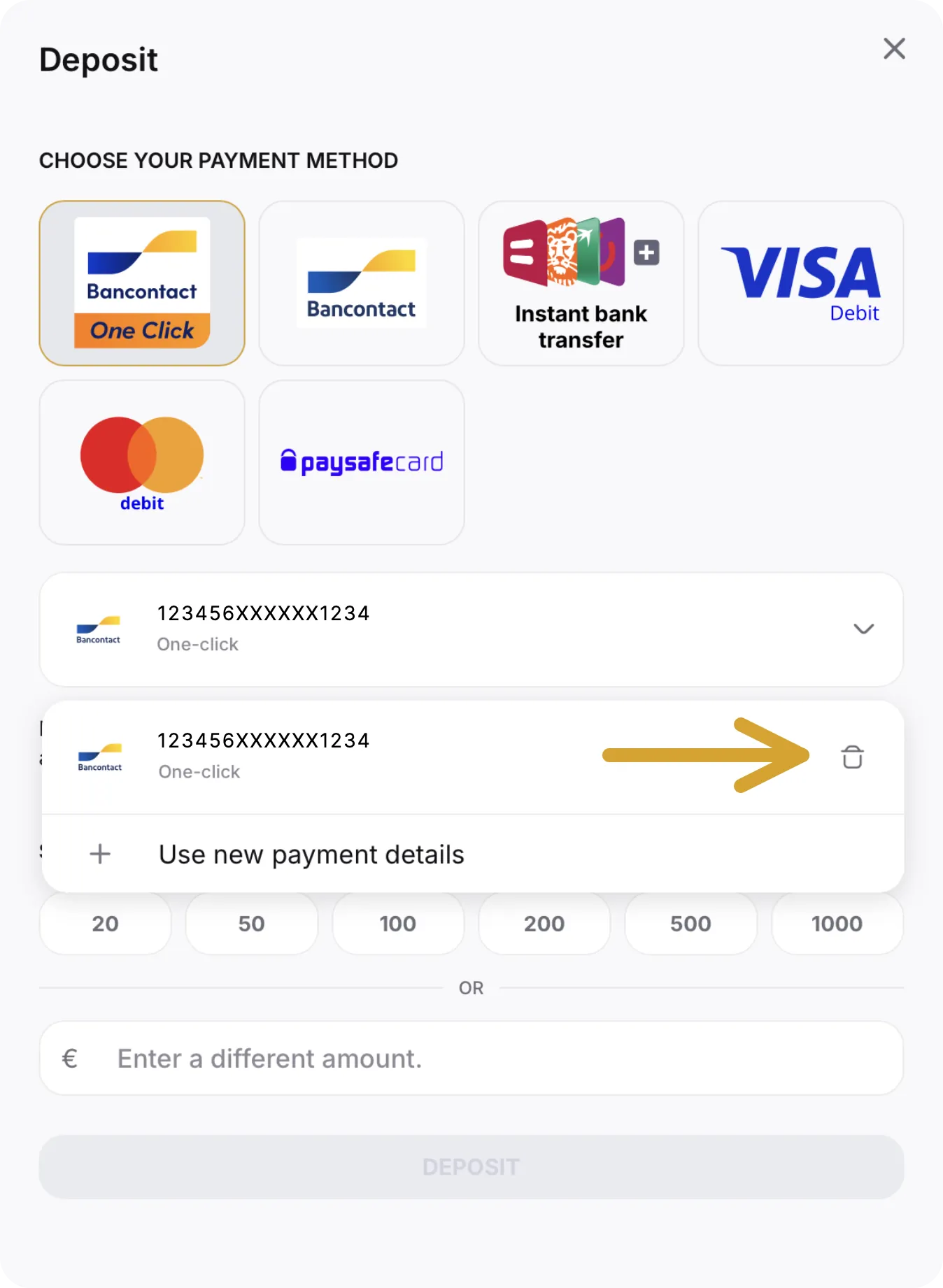
After confirmation, the token is deactivated immediately.
How to activate Bancontact One Click again
Want to use Bancontact One Click again on your favourite device? Simply activate a new token:
Log in on the device on which you want to use One Click.
Go to the deposit page.
Choose Bancontact One Click as your payment method.
Complete a deposit following the normal procedure.
Confirm to complete the deposit.
After the successful deposit, Bancontact One Click will be active from your next deposit onwards and a new token will be created and linked to that device.
What happens after you activate a new token?
From that point on, future deposits via Bancontact One Click will process quickly again.
Keep in mind that if you later activate One Click on a different device, the previous token may automatically become invalid. This is why you may need to remove and reactivate the token whenever you switch devices.
Back up and running quickly
Has Bancontact One Click suddenly stopped working? The token is most likely no longer linked to the device you are using. By removing the existing token and reactivating it, you can usually resolve this within a few minutes.
That way you can continue to enjoy fast, secure and user-friendly deposits at PepperMill Casino.
Why is my Bancontact One Click no longer working?
Usually because the token is linked to a different device. A Bancontact One Click token can only be active on one device at a time.
Do I need to contact my bank if my token is not working?
No. In most cases, simply removing the existing token and reactivating it via a new deposit is all that is needed.
Can I use the same token on multiple devices?
No. For security reasons, a Bancontact One Click token can only be active on one device at a time.
How long does it take to activate a new token?
A new activation happens immediately during a successful Bancontact deposit.
Will I lose my account or balance when I remove my token?
No. Only the One Click link is removed. Your PepperMill Casino account and balance remain unchanged.
 Blog
Blog